

Introduction to the Bar Timer Indicator
Most seasoned traders know that the closing price of the candle is usually significant. This tells them the behavior of the market and the potential direction of price. In fact, many seasoned traders believe that trading while the candle still has not closed is not a good habit.
The Bar Timer Indicator is a tool that allows traders to make the habit of trading only when the candle is about to close or when it has actually closed.
What is the Bar Timer Indicator?
The Bar Timer Indicator is an indicator which displays how much time is left before the candle for the current period would close. However, instead of displaying time, it indicates the remaining time in percentage form. The closer the percentage figure is to 100%, the closer the time for the candle to close. It also displays a horizontal bar formed by dots wherein a vertical bar runs to the right as the closing time of the candle nears 100%
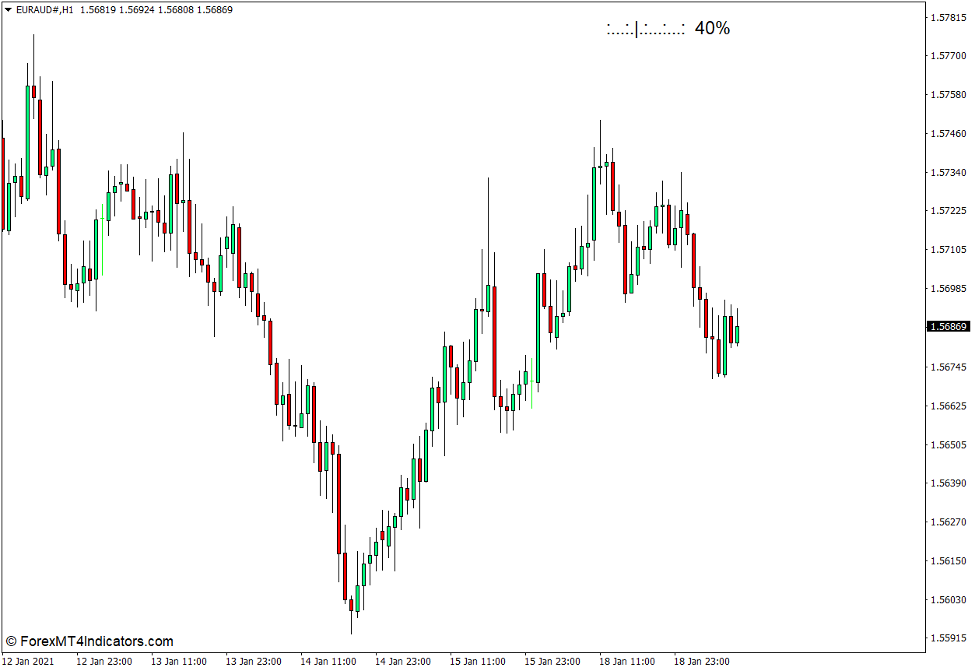
How the Bar Timer Indicator Works?
The Bar Timer Indicator works by using the time feed from the broker’s server. It then compares the current time with the remaining time for the candle to close depending on the timeframe used. This is then converted into percentage form and is displayed on the chart.
How to use the Bar Timer Indicator
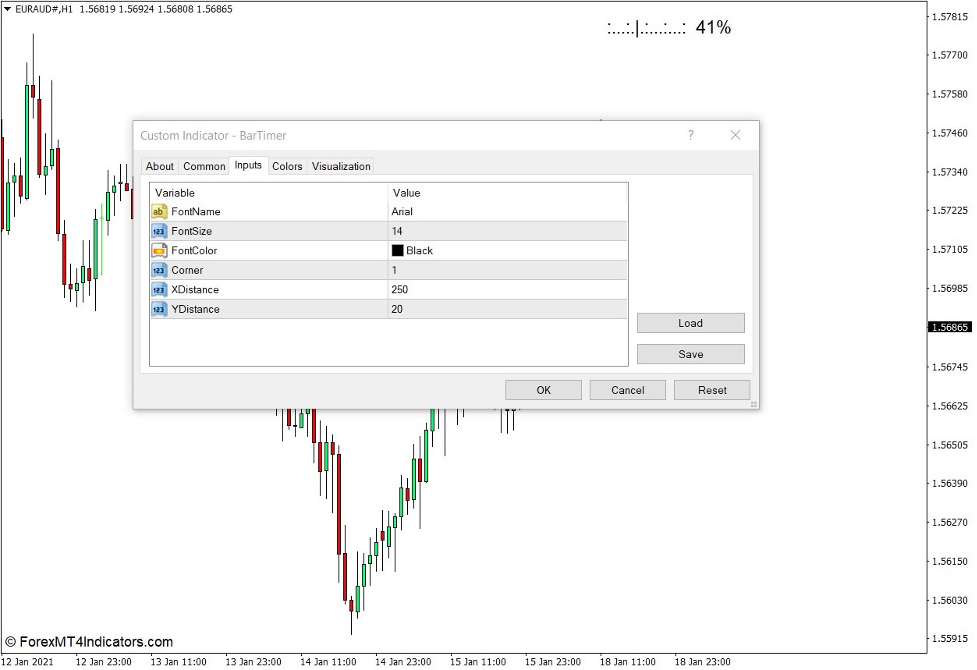
The Bar Timer Indicator has several options under the “Inputs” tab within its settings. These options are mostly for visual modification purposes only.
“FontName” allows users to modify the type of font used to display the percentage figure.
“FontSize” modifies the size of the font used for the percentage figure displayed.
“FontColor” allows users to change the color used by the indicator. This is preset at white so users who are trading on a price chart with a white background should change the color in order to make the indicator visible.
“Corner” allows users to shift the Bar Timer display on different corners on the price chart. The following are the various figures that represent each corner.
- 0 – upper left corner
- 1 – upper right corner
- 2 – lower left corner
- 3 – lower right corner
“XDistance” modifies the distance the Bar Timer is displayed from the edge of the chart along the x-axis.
On the other hand, “YDistance” modifies the distance the Bar Timer is displayed from the top or bottom of the price chart along the y-axis.
Conclusion
The Bar Timer Indicator is not the type of indicator which provides technical indications that are actionable in a trade setup. It does not provide trend or momentum indications, nor its possible reversal signals. It does not provide overbought and oversold indications and its corresponding mean reversal signal. It also does not provide support or resistance levels where traders can expect reversals.
What it does is simply provide a visual indication of how much time is left before the candle would close. This might not seem useful for most traders. However, there are also many traders whose strategies work best when traded at or near the close of the candle. This is especially true for strategies which use candlestick patterns. It is also a good combination for trade signal indicators which has the tendency to repaint. Trading near the close of the candle would decrease the chances that the candlestick pattern would change or the trade signal would repaint.
MT4 Indicators – Download Instructions
Bar Timer Indicator for MT4 is a Metatrader 4 (MT4) indicator and the essence of this technical indicator is to transform the accumulated history data.
Bar Timer Indicator for MT4 provides for an opportunity to detect various peculiarities and patterns in price dynamics which are invisible to the naked eye.
Based on this information, traders can assume further price movement and adjust their strategy accordingly. Click here for MT4 Strategies
Recommended Forex Metatrader 4 Trading Platform
- Free $50 To Start Trading Instantly
- Deposit Bonus up to $5,000
- Unlimited Loyalty Program
- Awards Winning Trading Broker

Click Here for Step By Step XM Trading Account Opening Guide
How to install Bar Timer Indicator for MT4.mq4?
- Download Bar Timer Indicator for MT4.mq4
- Copy Bar Timer Indicator for MT4.mq4 to your Metatrader Directory / experts / indicators /
- Start or restart your Metatrader 4 Client
- Select Chart and Timeframe where you want to test your MT4 indicators
- Search “Custom Indicators” in your Navigator mostly left in your Metatrader 4 Client
- Right click on Bar Timer Indicator for MT4.mq4
- Attach to a chart
- Modify settings or press ok
- Indicator Bar Timer Indicator for MT4.mq4 is available on your Chart
How to remove Bar Timer Indicator for MT4.mq4 from your Metatrader Chart?
- Select the Chart where is the Indicator running in your Metatrader 4 Client
- Right click into the Chart
- “Indicators list”
- Select the Indicator and delete
Bar Timer Indicator for MT4 (Free Download)
Click here below to download:
La entrada Bar Timer Indicator for MT4 se publicó primero en ForexMT4Indicators.com.