

Introduction to the Barros Swing Indicator
Only a few technical indicators can claim that it can be used as the main basis for a trading strategy. The Barros Swing Indicator is one of the few indicators that have the potential to be used for this purpose. This is because it uses swing highs and swing lows to identify patterns as well as support and resistance areas where price may reverse.
What is the Barros Swing Indicator?
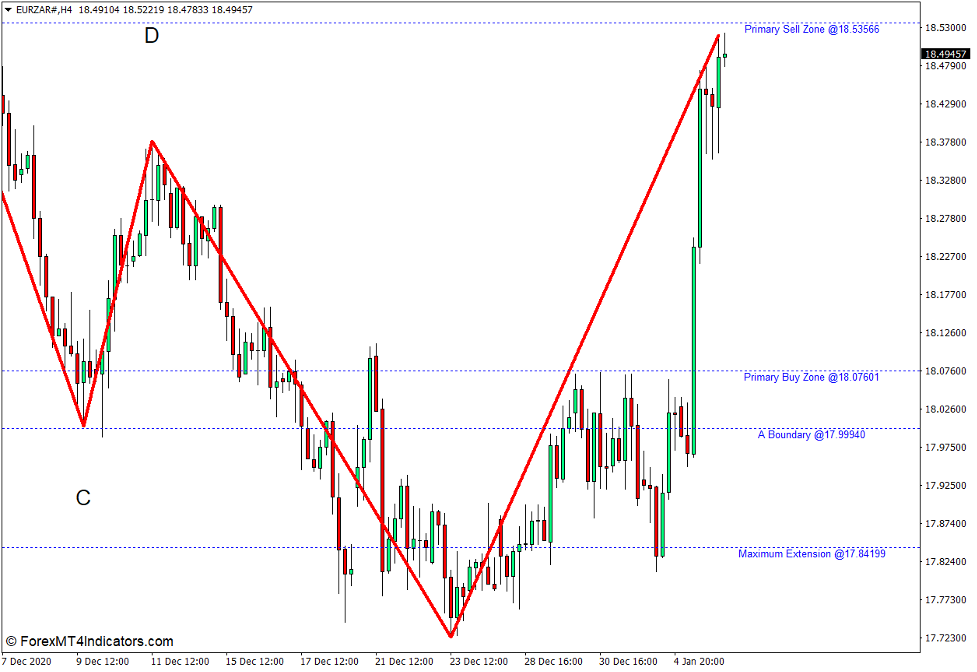
The Barros Swing Indicator is a custom technical indicator which identifies swing highs and swing lows as well as ABCD patterns using the same swing highs and swing lows. To do this, the Barros Swing Indicator plots, it plots a purple line to connect the swing highs and swing lows and a red line to connect the points of the ABCD patterns. It also marks the identified points of the ABCD patterns with its corresponding letter as labels. It then uses the last identified levels to mark areas where price is more likely to reverse and could therefore be an excellent buy or sell area.
How the Barros Swing Indicator Works?
The Barros Swing Indicator uses an underlying Zigzag Indicator to identify its swing highs and swing lows. It also connects the swing highs and swing lows the same way the Zigzag Indicator does.
The ABC patterns are then identified based on a set of algorithmic rules that define what the pattern should be. The indictor then marks the ABC pattern as a red line and labels its points.
How to use the Barros Swing Indicator for MT4
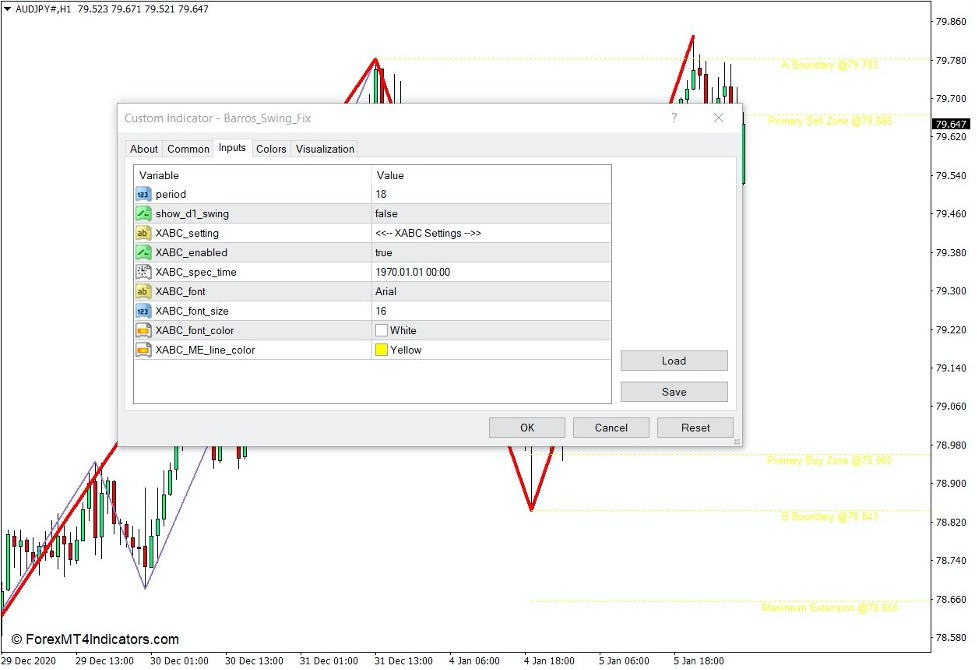
The Barros Swing Indicator has several settings options which can adjust its sensitivity as well as its aesthetics.
The “period” variable is the main field which users can use to adjust the sensitivity of the indicator.
“show d1 swing” toggles the indicator to display swing highs and swing lows that are based on the daily timeframe.
The “XABC enabled” option allows users to toggle the ABC patterns on or off.
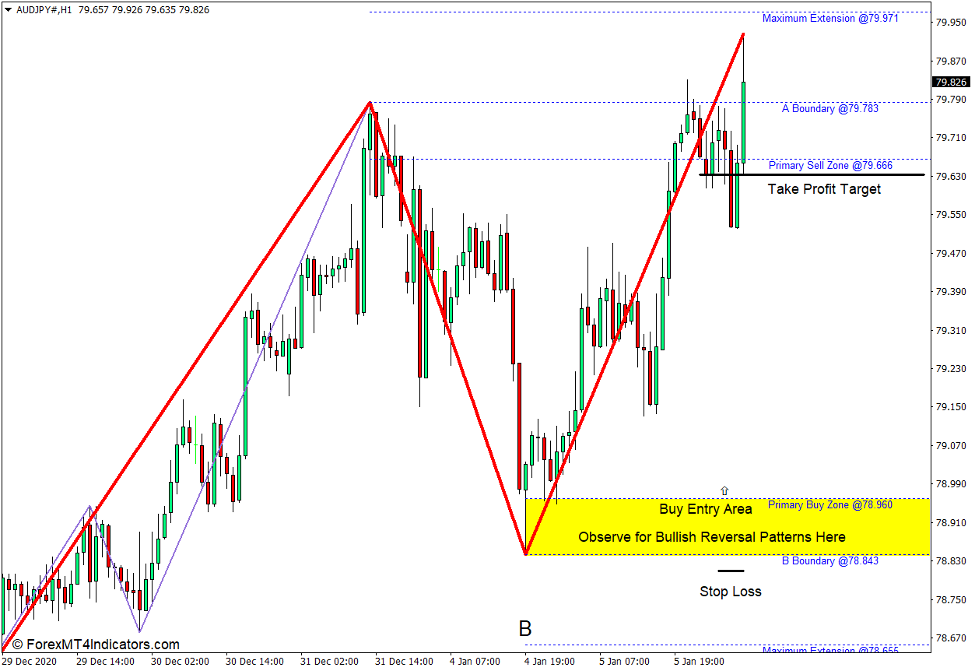
The Barros Swing Indicator already displays the areas where price may reverse. Traders can opt to observe price action for any signs of reversals as price reaches these areas.
Buy Trade Setup
When to Enter?
Open a buy order as price action shows signs of a bullish reversal within the area between the Primary Buy Zone and the Boundary. Set the stop loss below the Boundary.
When to Exit?
Set the take profit target at the next swing high level or below the opposite Primary Sell Zone.
Sell Trade Setup
When to Enter?
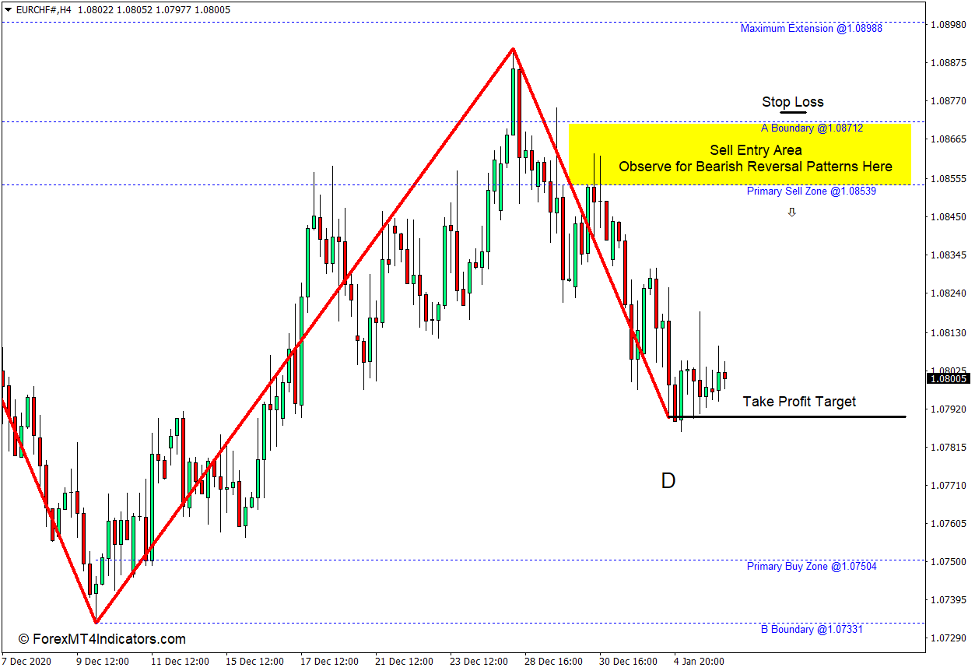
Open a sell order as price action shows signs of a bearish reversal within the area between the Primary Sell Zone and the Boundary. Set the stop loss above the Boundary.
When to Exit?
Set the take profit target at the next swing low level or above the opposite Primary Buy Zone.
Conclusion
This indicator can be a trading strategy within itself. It has some elements of a market flow strategy, a supply and demand strategy, as well as an ABC pattern setup. Although this indicator can be used as a basis for a strategy, users should not trade it blindly. Instead, traders should observe for the right reversal price action patterns that develop within the identified reversal areas and trade patterns that tend to have a higher accuracy.
MT4 Indicators – Download Instructions
Barros Swing Indicator for MT4 is a Metatrader 4 (MT4) indicator and the essence of this technical indicator is to transform the accumulated history data.
Barros Swing Indicator for MT4 provides for an opportunity to detect various peculiarities and patterns in price dynamics which are invisible to the naked eye.
Based on this information, traders can assume further price movement and adjust their strategy accordingly. Click here for MT4 Strategies
Recommended Forex Metatrader 4 Trading Platform
- Free $50 To Start Trading Instantly
- Deposit Bonus up to $5,000
- Unlimited Loyalty Program
- Awards Winning Trading Broker

Click Here for Step By Step XM Trading Account Opening Guide
How to install Barros Swing Indicator for MT4.mq4?
- Download Barros Swing Indicator for MT4.mq4
- Copy Barros Swing Indicator for MT4.mq4 to your Metatrader Directory / experts / indicators /
- Start or restart your Metatrader 4 Client
- Select Chart and Timeframe where you want to test your MT4 indicators
- Search “Custom Indicators” in your Navigator mostly left in your Metatrader 4 Client
- Right click on Barros Swing Indicator for MT4.mq4
- Attach to a chart
- Modify settings or press ok
- Indicator Barros Swing Indicator for MT4.mq4 is available on your Chart
How to remove Barros Swing Indicator for MT4.mq4 from your Metatrader Chart?
- Select the Chart where is the Indicator running in your Metatrader 4 Client
- Right click into the Chart
- “Indicators list”
- Select the Indicator and delete
Barros Swing Indicator for MT4 (Free Download)
Click here below to download:
La entrada Barros Swing Indicator for MT4 se publicó primero en ForexMT4Indicators.com.