

Introduction to the Pivot Points MTF Indicator
Pivot Point levels are one of the few levels that seasoned traders take note of. This is because these levels are points of interest where price action may reverse from or break out of.
The Pivot Points MTF Indicator is a versatile variation of the Pivot Points Indicator which has more capabilities compared to other versions.
What is the Pivot Points MTF Indicator?
The Pivot Points MTF Indicator is a modified version of a Pivot Point Indicator. The acronym “MTF” on the Pivot Points MTF Indicator stands for “Multi Time Frame”. As the name suggests, the Pivot Points MTF Indicator is a variation of the Pivot Points indicator which has the capability to plot Pivot Points based on various timeframes instead of the usual daily, weekly, and monthly Pivot Points. Aside from the timeframes, this indicator also has various options which modifies the type of Pivot Points used.
This version of the Pivot Points plots up to nine Pivot Point levels – the main Pivot Point (PP), four Resistance lines above the main Pivot Point (R1, R2, R3, and R4), and four Support lines below the main Pivot Point (S1, S2, S3, and S4).

How the Pivot Points MTF Indicator Works
The Pivot Points MTF Indicator has several calculations within its algorithm because it allows traders to use different types of Pivot Point calculation methods within its settings. However, the classic Pivot Points calculation is as follows:
PP = (High + Low + Close) / 3
R1 = (PP x 2) – Low
R2 = PP + (High – Low)
S1 = (PP x 2) – High
S2 = PP – (High – Low)
It uses its calculations depending on the Pivot Point method used on the timeframe chosen. For example, a Daily Pivot Point would use the high, low, and close price of the previous day’s price candle.
How to use the Pivot Points MTF Indicator for MT4
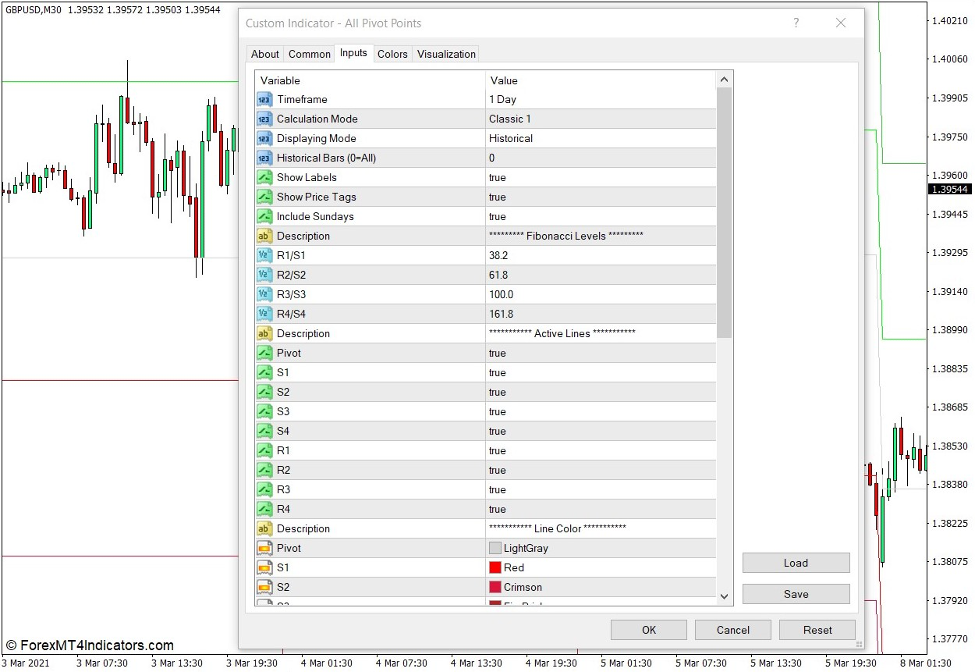
The Pivot Points MTF is a very versatile version of the Pivot Point indicator. As such, it has several options within its indicator settings.
It allows users to choose the “Timeframe” used for the calculation, as well as the “Calculation Mode”.
It also allows users to toggle the display of Historical Pivot Points or just show today’s Pivot Points.
Since there are Pivot Point versions that use Fibonacci Levels, such as the Camarilla Pivot Point, it also allows users to modify the Fibonacci Levels used for the calculations.
It also allows users to toggle the display of each Pivot Point level on or off individually under the “Active Lines” section.
It also allows users to modify the color of each line.
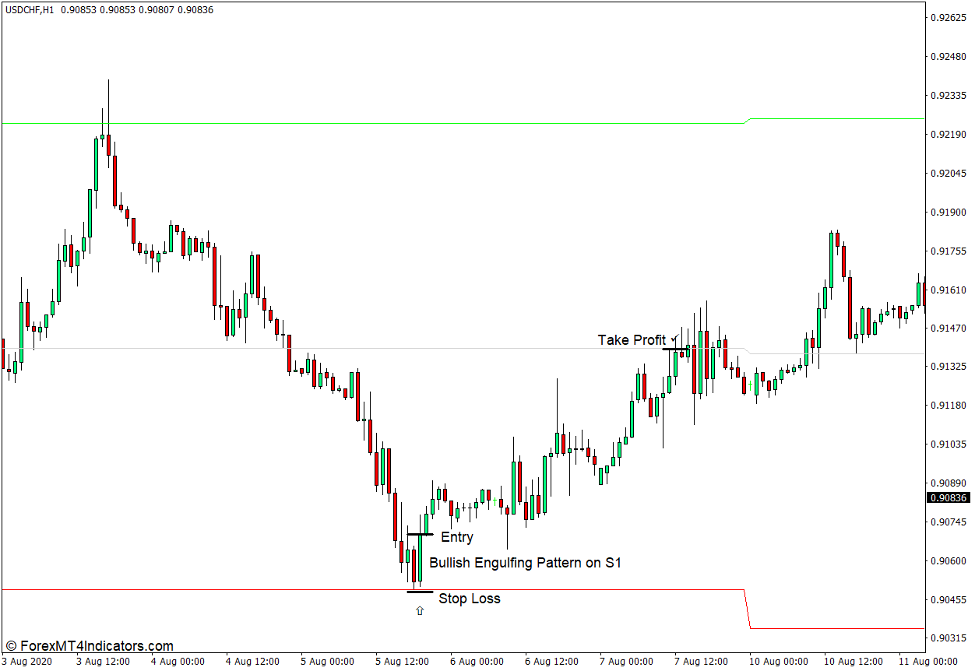
Buy Trade Setup
When to Enter?
Open a buy order as soon as a bullish reversal signal or pattern forms on the Pivot Point level or on a Support level.
When to Exit?
Set the take profit target on the next Pivot Point level above the entry level.
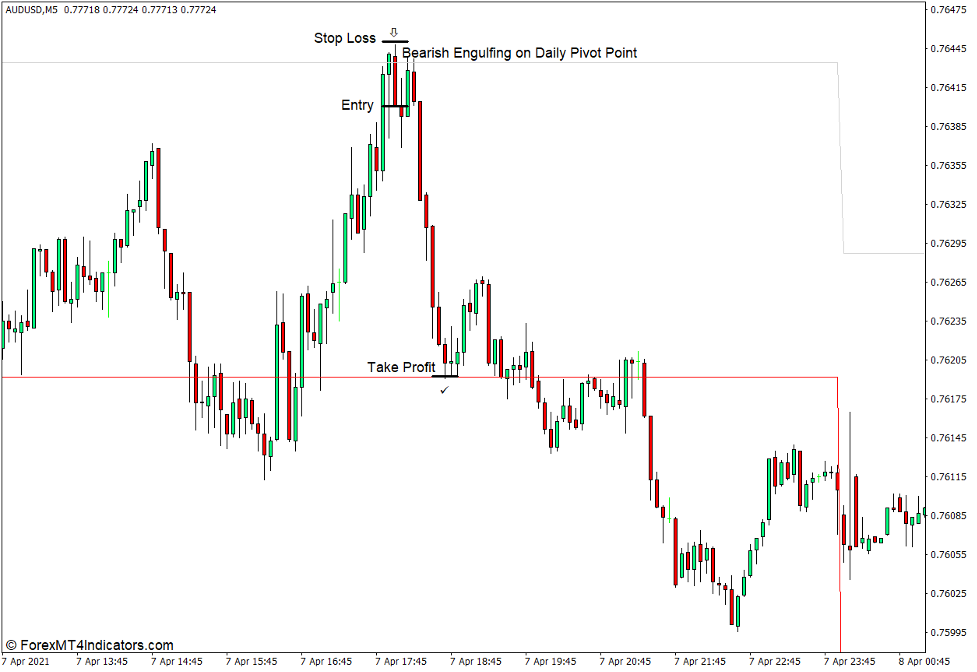
Sell Trade Setup
When to Enter?
Open a buy order as soon as a bearish reversal signal or pattern forms on the Pivot Point level or on a Support level.
When to Exit?
Set the take profit target on the next Pivot Point level above the entry level.
Conclusion
Pivot Point Indicators are very useful technical indicators. This is why many professional traders use it. Price action would typically react on these levels. However, traders should still use other technical analysis techniques to observe either a reversal or a breakout on these levels.
MT4 Indicators – Download Instructions
Pivot Points MTF Indicator for MT4 is a Metatrader 4 (MT4) indicator and the essence of this technical indicator is to transform the accumulated history data.
Pivot Points MTF Indicator for MT4 provides for an opportunity to detect various peculiarities and patterns in price dynamics which are invisible to the naked eye.
Based on this information, traders can assume further price movement and adjust their strategy accordingly. Click here for MT4 Strategies
Recommended Forex Metatrader 4 Trading Platform
- International broker with 24/7 support.
- Over 12,000 assets, including Stocks, Indices, Forex.
- Fastest order execution and spreads from 0 pips.
- Bonuses up to $50,000 starting from the first deposit.
- Demo accounts for testing trading strategies.

Click Here for Step By Step RoboForex Trading Account Opening Guide
How to install Pivot Points MTF Indicator for MT4.mq4?
- Download Pivot Points MTF Indicator for MT4.mq4
- Copy Pivot Points MTF Indicator for MT4.mq4 to your Metatrader Directory / experts / indicators /
- Start or restart your Metatrader 4 Client
- Select Chart and Timeframe where you want to test your MT4 indicators
- Search “Custom Indicators” in your Navigator mostly left in your Metatrader 4 Client
- Right click on Pivot Points MTF Indicator for MT4.mq4
- Attach to a chart
- Modify settings or press ok
- Indicator Pivot Points MTF Indicator for MT4.mq4 is available on your Chart
How to remove Pivot Points MTF Indicator for MT4.mq4 from your Metatrader Chart?
- Select the Chart where is the Indicator running in your Metatrader 4 Client
- Right click into the Chart
- “Indicators list”
- Select the Indicator and delete
Pivot Points MTF Indicator for MT4 (Free Download)
Click here below to download:
La entrada Pivot Points MTF Indicator for MT4 se publicó primero en ForexMT4Indicators.com.