

Introduction to the Price Volume Trend Indicator
Most momentum oscillators focus solely on price movements. Most oscillators have a formula which only uses price as a basis for its value. However, momentum technically has another element, which is volume. The Price Volume Trend Indicator is one of the few momentum oscillators which incorporate volume within its algorithm.
What is the Price Volume Trend Indicator?
The Price Volume Trend Indicator or PVT is a trend following oscillator type of indicator which incorporates volume. It is a momentum based oscillator which is used to measure money flow while including volume within its consideration of price movements.
The PVT Indicator is somewhat very similar to the On Balance Volume (OBV) Indicator as the OBV indicator also uses volume as a basis for its plotting of its oscillator line. The difference is that while the OBV calculates based on close prices, the PVT adjusts the close price based on the percentage change of price. This creates a smoother oscillator compared to the OBV.
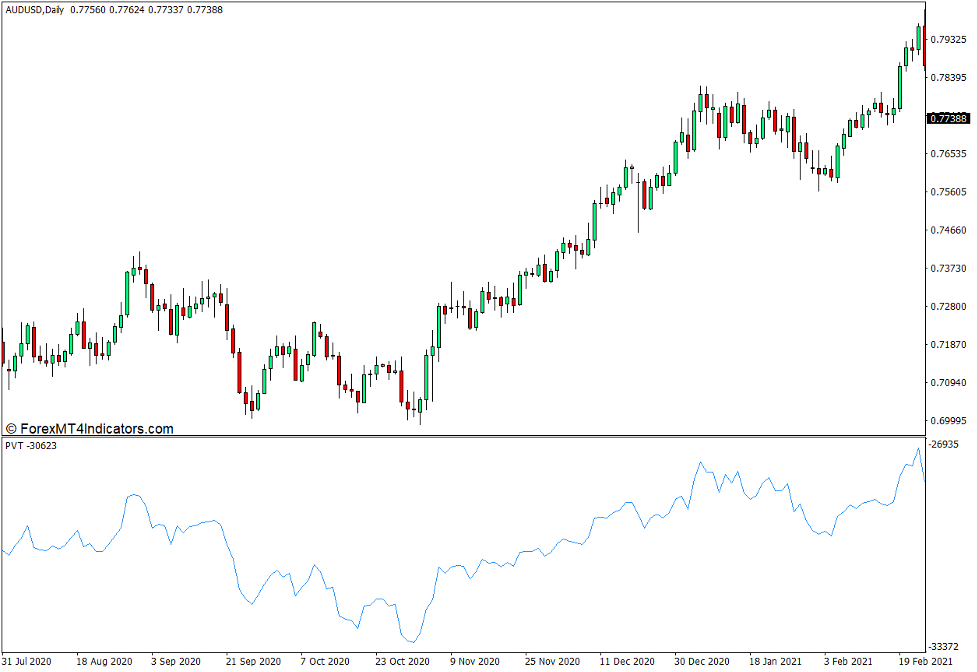
This basic PVT oscillator plots a line which oscillates freely, unbound by a fixed range.
How the Price Volume Trend Indicator Works?
The Price Volume Trend Indicator has an algorithm which calculates for the difference between the Current Close and the Previous Close, then divides the difference by the Previous Close. It then multiplies the result with the Volume. It then adds the product to the Previous PVT value.
PVT = {[(Current Close – Previous Close) / Previous Close] x Volume} + Previous PVT
The resulting value is then plotted as a point on the PVT oscillator line.
How to use the Price Volume Trend Indicator for MT4
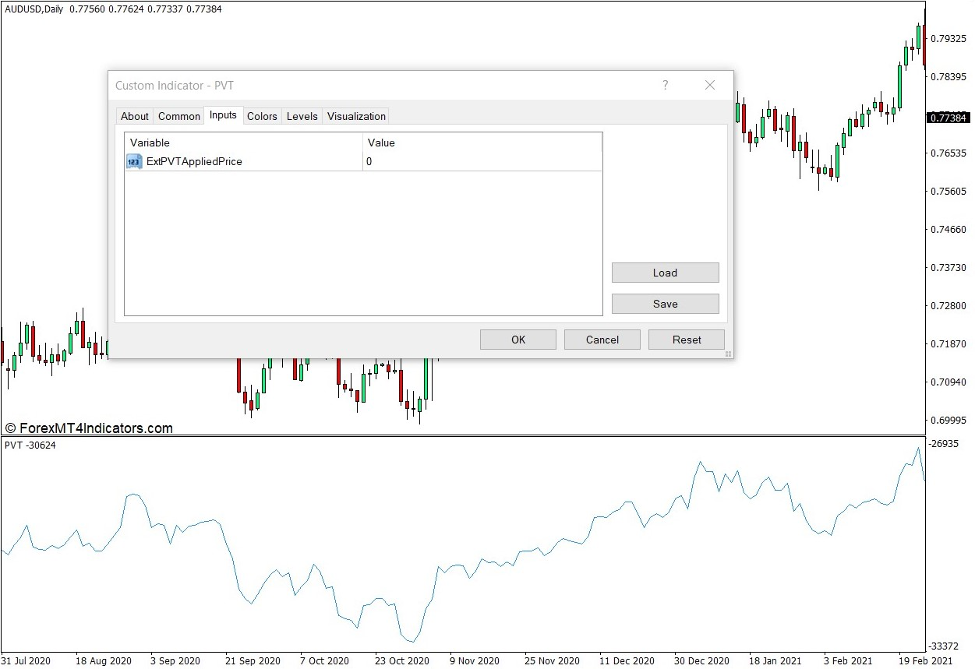
The Price Volume Trend Indicator has a single option within its indicator settings which slightly modifies the movements of its oscillator line.
“ExtPVTApppliedPrice” refers to the price point on the chart which would be used by the indicator to calculate for the PVT value. This modifies the use of the Close Price to any point on the bar, which could be the open, high, low, and close.
There are several ways to use the PVT oscillator.
The most basic would be to use the sudden spikes and drops on the PVT line as an indication of momentum direction. However, this can be a very subjective signal. As such, many traders would add a moving average on the PVT line to act as a signal line.
Another method would be to use the PVT oscillator to observe for potential reversal signals based on divergences.
Buy Trade Setup
When to Enter?
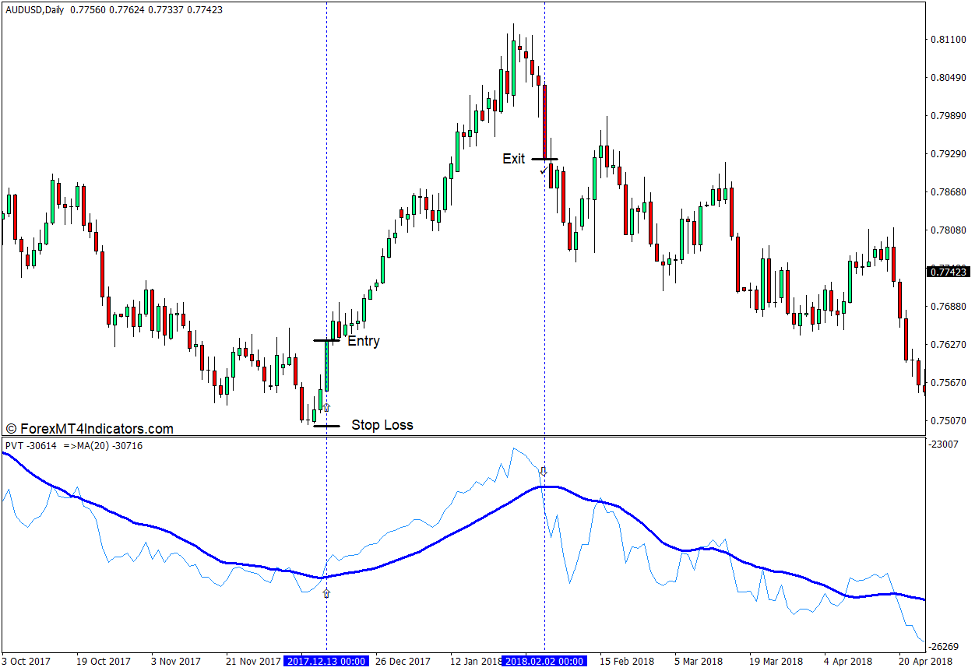
Open a buy order as soon as the PVT line crosses above its paired moving average signal line.
When to Exit?
Close the trade as soon as the PVT line crosses below its paired moving average signal line.
Sell Trade Setup
When to Enter?
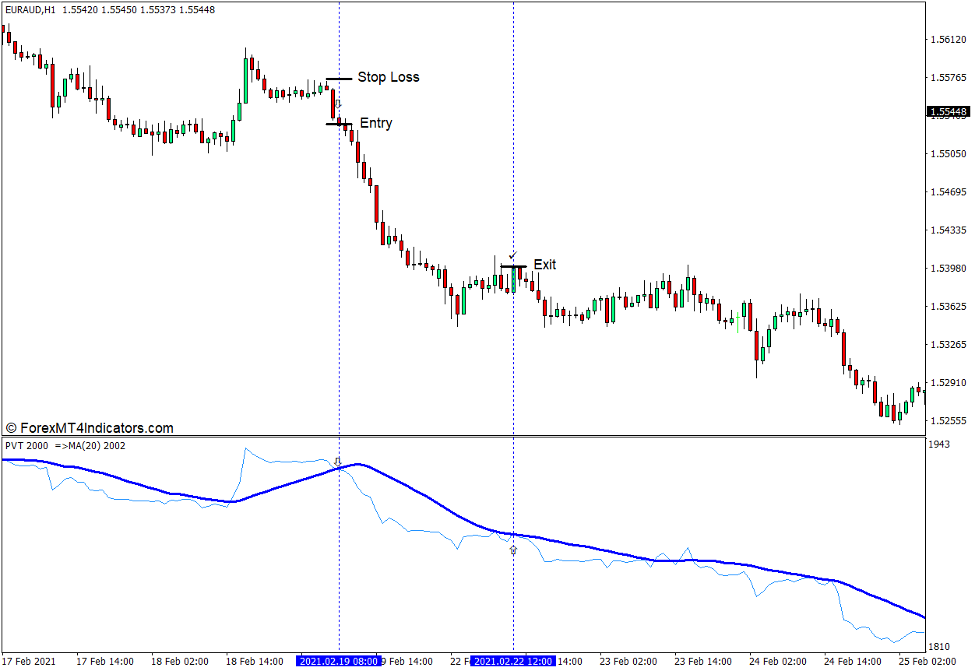
Open a sell order as soon as the PVT line crosses below its paired moving average signal line.
When to Exit?
Close the trade as soon as the PVT line crosses above its paired moving average signal line.
Conclusion
The PVT line can be a very valuable information. However, as a standalone indicator, this momentum oscillator can sometimes be very confusing to use. As such, it is best to use this indicator as a part of larger trading strategy in confluence with other technical indications.
MT4 Indicators – Download Instructions
Price Volume Trend Indicator for MT4 is a Metatrader 4 (MT4) indicator and the essence of this technical indicator is to transform the accumulated history data.
Price Volume Trend Indicator for MT4 provides for an opportunity to detect various peculiarities and patterns in price dynamics which are invisible to the naked eye.
Based on this information, traders can assume further price movement and adjust their strategy accordingly. Click here for MT4 Strategies
Recommended Forex Metatrader 4 Trading Platform
- International broker with 24/7 support.
- Over 12,000 assets, including Stocks, Indices, Forex.
- Fastest order execution and spreads from 0 pips.
- Bonuses up to $50,000 starting from the first deposit.
- Demo accounts for testing trading strategies.

Click Here for Step By Step RoboForex Trading Account Opening Guide
How to install Price Volume Trend Indicator for MT4.mq4?
- Download Price Volume Trend Indicator for MT4.mq4
- Copy Price Volume Trend Indicator for MT4.mq4 to your Metatrader Directory / experts / indicators /
- Start or restart your Metatrader 4 Client
- Select Chart and Timeframe where you want to test your MT4 indicators
- Search “Custom Indicators” in your Navigator mostly left in your Metatrader 4 Client
- Right click on Price Volume Trend Indicator for MT4.mq4
- Attach to a chart
- Modify settings or press ok
- Indicator Price Volume Trend Indicator for MT4.mq4 is available on your Chart
How to remove Price Volume Trend Indicator for MT4.mq4 from your Metatrader Chart?
- Select the Chart where is the Indicator running in your Metatrader 4 Client
- Right click into the Chart
- “Indicators list”
- Select the Indicator and delete
Price Volume Trend Indicator for MT4 (Free Download)
Click here below to download:
La entrada Price Volume Trend Indicator for MT4 se publicó primero en ForexMT4Indicators.com.