

Introduction to the SHI Channel True Indicator
Plotting trendlines is probably the most basic skill that technical traders would develop. However, it is also probably one of the most effective technical analysis techniques that traders would have. Identifying the correct trendlines and channels allow traders to anticipate the direction of price, as well as the area where it could reverse.
The SHI Channel True Indicator is a tool which simplifies this process as it automatically identifies trendlines and channels.
What is the SHI Channel True Indicator?
The SHI Channel True Indicator is a custom technical indicator which automatically plots a channel based on price action swings.
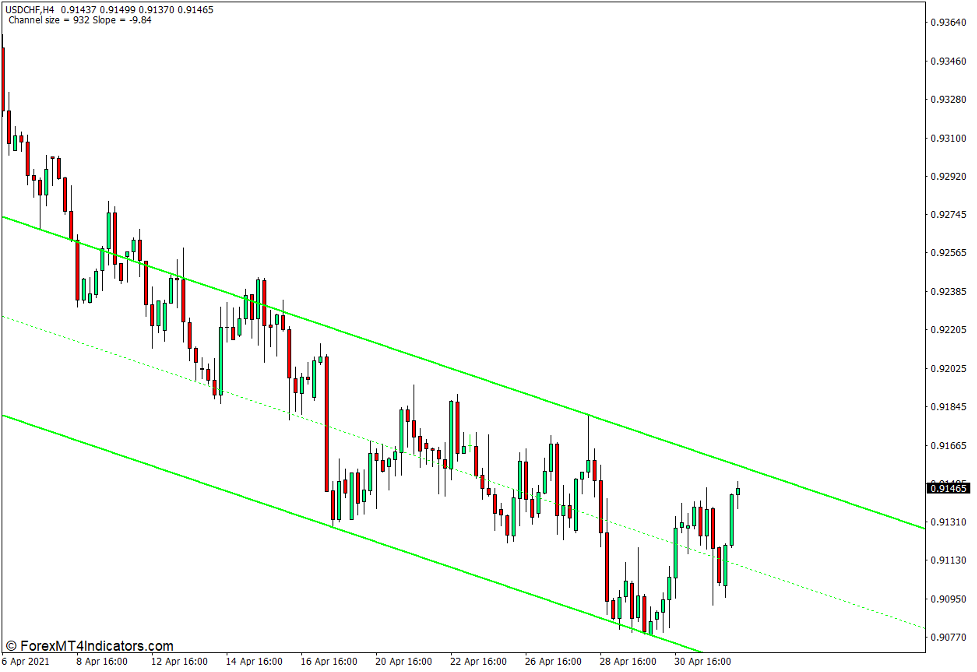
This indicator plots three lines which form a channel like structure. The top line is the resistance line of the channel and the bottom line is the support line. Its middle line is basically the median of the support and resistance line of the channel.
How the SHI Channel True Indicator Works?
The SHI Channel True Indicator uses the most recent major swing highs and swing lows of price action to identify the main support or resistance trendline. These swing highs and swing lows use the same concept for identifying swing highs and swing lows as the Zigzag Indicator.
If the most recent major swing points are the lows, then the channel is formed based on the support line, while the resistance trendline is drawn parallel to the support line at a distance which would cover the range of the channel.
Inversely, if the most recent swing points are swing highs, then the basis for the channel would be the resistance trendline. The support line is then drawn parallel to the resistance trendline at a distance which would cover the range of the channel.
The middle line is basically the midpoint of the channel. It is basically drawn halfway between the support and resistance trendlines.
How to use the SHI Channel True Indicator for MT4
The SHI Channel True Indicator has a couple of settings which modifies how the channel is drawn.

The “All Bars” variable refers to the number of bars in which the SHI Channel True Indicator would identify swing highs and swing lows in which it would base its support and resistance lines.
The “Bars For Fract” refers to the number of bars which the indicator would consider as a fractal pattern.
SHI Channel True Indicator as a Trend Direction Indicator
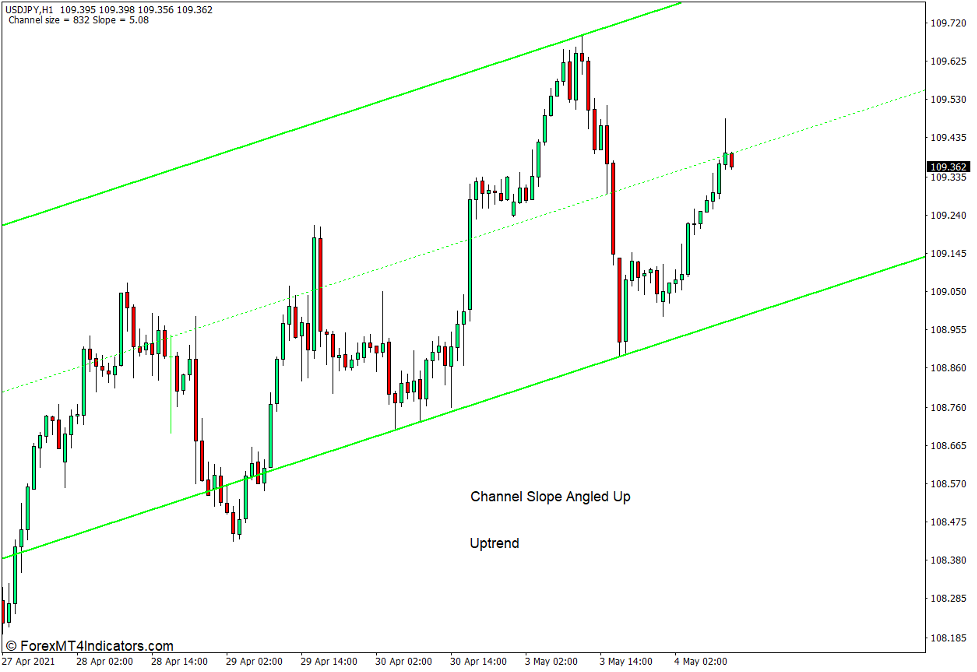
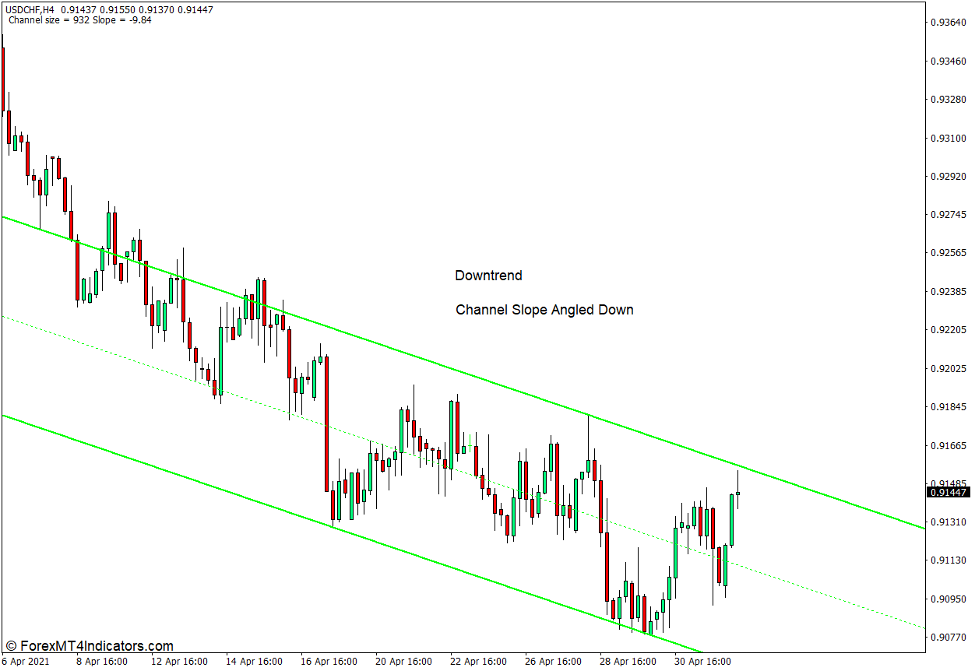
The SHI Channel True Indicator can be used as a trend direction indicator. This is because the angle of the channel it plots gives a clear indication of where the trend is moving. It slopes up whenever the market is in an uptrend and down whenever the market is in an uptrend. The steeper the slope, the stronger the trend.
SHI Channel True Reversal Areas
Although the SHI Channel True Indicator is not a signal indicator, it can show the areas where price may reverse. In an uptrend, the support line would be the ideal reversal area, while in a downtrend, the resistance line would be the ideal reversal entry area.
Conclusion
The SHI Channel True Indicator is not a signal indicator which would provide entry and exit points. However, it is a very useful tool that could help traders spot potential trade setups based on support and resistance trendlines.
MT4 Indicators – Download Instructions
SHI Channel True Indicator for MT4 is a Metatrader 4 (MT4) indicator and the essence of this technical indicator is to transform the accumulated history data.
SHI Channel True Indicator for MT4 provides for an opportunity to detect various peculiarities and patterns in price dynamics which are invisible to the naked eye.
Based on this information, traders can assume further price movement and adjust their strategy accordingly. Click here for MT4 Strategies
Recommended Forex Metatrader 4 Trading Platform
- International broker with 24/7 support.
- Over 12,000 assets, including Stocks, Indices, Forex.
- Fastest order execution and spreads from 0 pips.
- Bonuses up to $50,000 starting from the first deposit.
- Demo accounts for testing trading strategies.

Click Here for Step By Step RoboForex Trading Account Opening Guide
How to install SHI Channel True Indicator for MT4.mq4?
- Download SHI Channel True Indicator for MT4.mq4
- Copy SHI Channel True Indicator for MT4.mq4 to your Metatrader Directory / experts / indicators /
- Start or restart your Metatrader 4 Client
- Select Chart and Timeframe where you want to test your MT4 indicators
- Search “Custom Indicators” in your Navigator mostly left in your Metatrader 4 Client
- Right click on SHI Channel True Indicator for MT4.mq4
- Attach to a chart
- Modify settings or press ok
- Indicator SHI Channel True Indicator for MT4.mq4 is available on your Chart
How to remove SHI Channel True Indicator for MT4.mq4 from your Metatrader Chart?
- Select the Chart where is the Indicator running in your Metatrader 4 Client
- Right click into the Chart
- “Indicators list”
- Select the Indicator and delete
SHI Channel True Indicator for MT4 (Free Download)
Click here below to download:
La entrada SHI Channel True Indicator for MT4 se publicó primero en ForexMT4Indicators.com.