

Introduction to the T3 Moving Average Indicator
Most moving average lines tend to either be responsive yet too erratic or smooth yet too lagging. The T3 Moving Average, developed by Tim Tillson, is said to be an improved version of the basic moving average lines as it tends to be smoother yet more responsive at the same time.
What is the T3 Moving Average Indicator?
The T3 Moving Average Indicator is a custom technical indicator which is a modified version of the basic Exponential Moving Average (EMA).
This version of the T3 Moving Average Indicator plots a solid red line on the price chart, which is a characteristically smooth yet responsive moving average line.
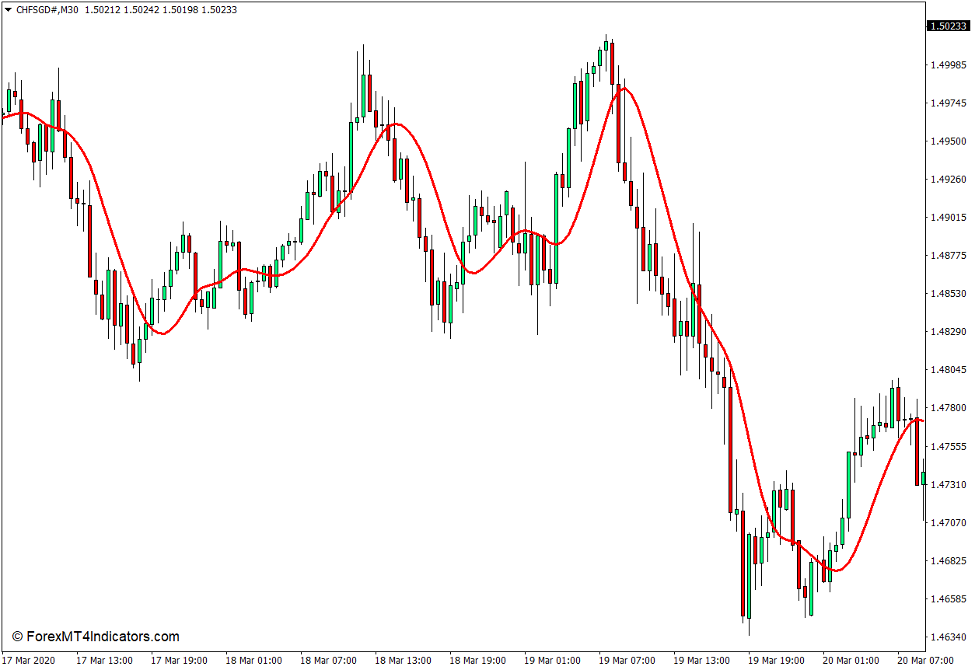
How the T3 Moving Average Indicator Works?
The T3 Moving Average uses a different formula compared to most moving average line variations. It derives its computation from a General DEMA (GD), which is somewhat a normalized Double Exponential Moving Average (EMA). The DEMA in turn is also derived from the basic Exponential Moving Average (EMA) line.
It also incorporates a volume factor within its computation which dictates how responsive the moving average line would be to linear trends.
The T3 Moving Average Indicator then plots its moving average line based on its complex formula.
How to use the T3 Moving Average Indicator for MT4
The T3 Moving Average Indicator has a “T3 Period” variable which allows for modifications of the number of bars used in its formula.
It also allows traders to modify its smoothing effect or volume factor using the “b” variable within its indicator settings.
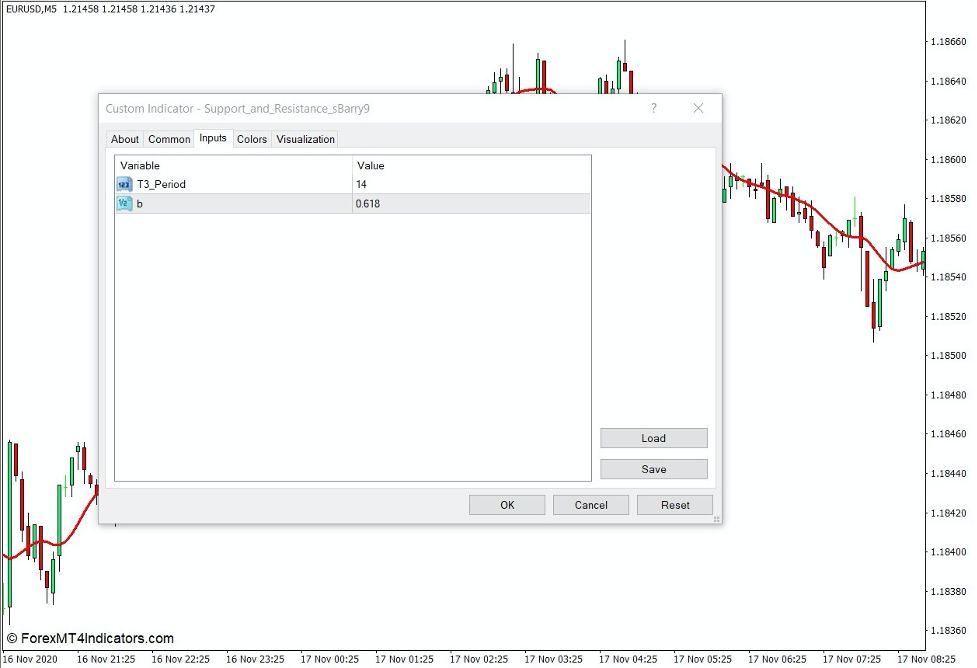
The T3 Moving Average Indicator can be used to identify trend or momentum direction based on where price action generally is in relation to the moving average line, as well as the slope of the moving average line.
It can also be used as a reversal signal based on moving average crossovers with another moving average or with price action.
It could also act as a dynamic support or resistance level where price can reverse from.
Buy Trade Setup
When to Enter?
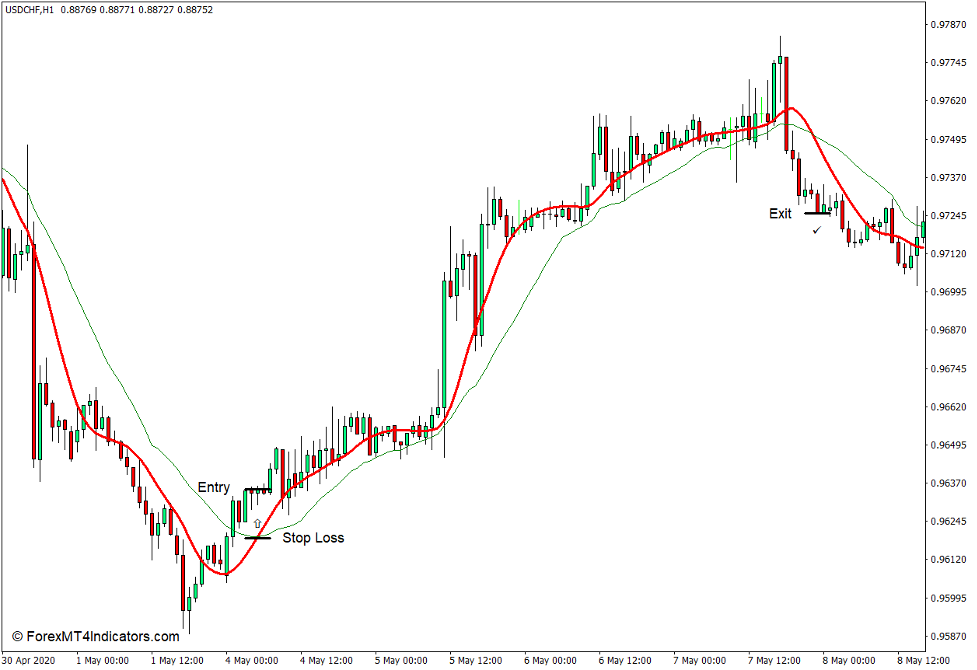
Add another moving average line to pair with the T3 Moving Average line as a moving average crossover. Open a buy order as soon as the T3 Moving Average line crosses above the other moving average line. Set the stop loss below the moving average lines.
When to Exit?
Close the trade as soon as the T3 Moving Average line crosses below the other moving average line.
Sell Trade Setup
When to Enter?
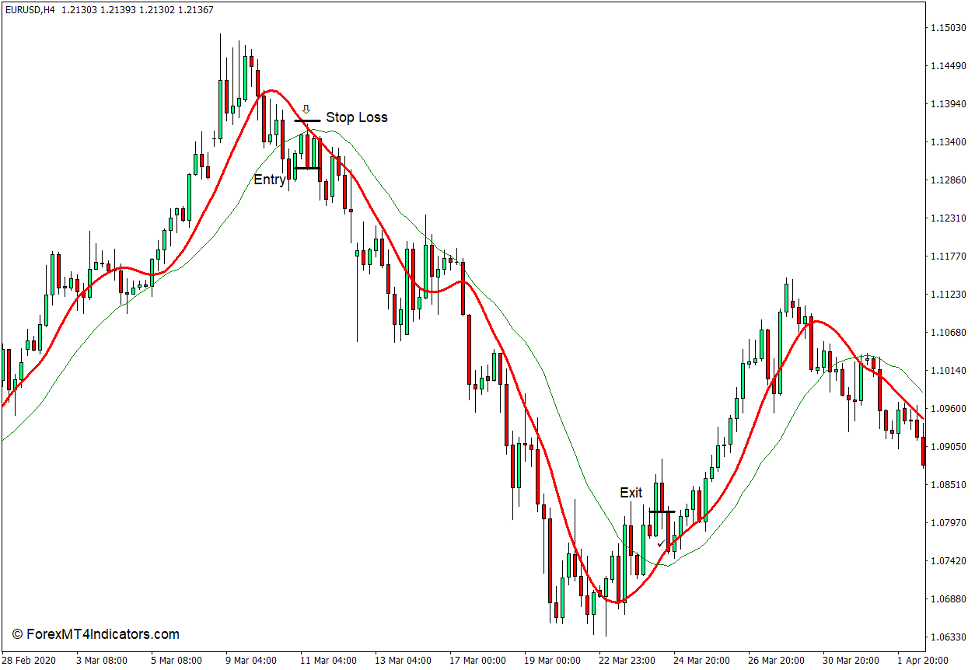
Add another moving average line to pair with the T3 Moving Average line as a moving average crossover. Open a sell order as soon as the T3 Moving Average line crosses below the other moving average line. Set the stop loss above the moving average lines.
When to Exit?
Close the trade as soon as the T3 Moving Average line crosses above the other moving average line.
Conclusion
The Exponential Moving Average line is a basic attempt to smoothen out a moving average line while improving its responsiveness. The T3 Moving Average takes it a step further by smoothening the moving average line further and making it even more responsive.
MT4 Indicators – Download Instructions
T3 Moving Average Indicator for MT4 is a Metatrader 4 (MT4) indicator and the essence of this technical indicator is to transform the accumulated history data.
T3 Moving Average Indicator for MT4 provides for an opportunity to detect various peculiarities and patterns in price dynamics which are invisible to the naked eye.
Based on this information, traders can assume further price movement and adjust their strategy accordingly. Click here for MT4 Strategies
Recommended Forex Metatrader 5 Trading Platform
- Free $30 To Start Trading Instantly
- Deposit Bonus up to $5,000
- Unlimited Loyalty Program
- Awards Winning Trading Broker

Click Here for Step By Step XM Trading Account Opening Guide
How to install T3 Moving Average Indicator for MT4.mq4?
- Download T3 Moving Average Indicator for MT4.mq4
- Copy T3 Moving Average Indicator for MT4.mq4 to your Metatrader Directory / experts / indicators /
- Start or restart your Metatrader 4 Client
- Select Chart and Timeframe where you want to test your MT4 indicators
- Search “Custom Indicators” in your Navigator mostly left in your Metatrader 4 Client
- Right click on T3 Moving Average Indicator for MT4.mq4
- Attach to a chart
- Modify settings or press ok
- Indicator T3 Moving Average Indicator for MT4.mq4 is available on your Chart
How to remove T3 Moving Average Indicator for MT4.mq4 from your Metatrader Chart?
- Select the Chart where is the Indicator running in your Metatrader 4 Client
- Right click into the Chart
- “Indicators list”
- Select the Indicator and delete
T3 Moving Average Indicator for MT4 (Free Download)
Click here below to download:
La entrada T3 Moving Average Indicator for MT4 se publicó primero en ForexMT4Indicators.com.